Theme
WARNING
Dev tools are removed in the download package, you need to delete folder /vendor and run command composer install to reinstall it, then you can use dev commands.
Theme Directory Structure
IMPORTANT
When developing a theme, you only need to create files in platform/themes/{theme-name}/. The public/themes/{theme-name}/ directory is automatically generated when you activate the theme or publish assets.
Thesky9 CMS uses two directories for themes:
| Directory | Purpose |
|---|---|
platform/themes/{name}/ | Source files - Where you develop your theme. Contains views, functions, widgets, and a public/ subfolder for assets. |
public/themes/{name}/ | Published assets - Auto-generated from platform/themes/{name}/public/. Do NOT edit files here directly. |
How It Works
- You create/edit files in
platform/themes/{theme-name}/ - The CMS automatically copies contents of
platform/themes/{theme-name}/public/topublic/themes/{theme-name}/when:- You activate the theme
- You run
php artisan cms:theme:assets:publish - You save theme options
Theme Source Structure
platform/themes/your-theme/
├── assets/              # Source files (SCSS, JS before compilation) - optional
│   ├── sass/
│   └── js/
├── functions/           # Theme functions (shortcodes, theme options, etc.)
├── lang/                # Translation files
├── layouts/             # Layout files
├── partials/            # Partial views
├── public/              # PUBLIC ASSETS - these get published to public/themes/your-theme/
│   ├── css/             # Compiled CSS
│   ├── js/              # Compiled/final JS
│   ├── images/          # Images
│   └── fonts/           # Fonts
├── routes/              # Theme routes
├── views/               # Theme views
├── widgets/             # Theme widgets
├── config.php           # Theme configuration
├── screenshot.png       # Theme preview image
├── theme.json           # Theme metadata
└── webpack.mix.js       # Asset compilation config (optional)
WARNING
When you install a theme package, you only need to extract it to platform/themes/. The public/themes/ directory will be created automatically when the theme is activated.
Creating a Theme
The first time you have to create theme "demo" structure, using the artisan command:
php artisan cms:theme:create demoTroubleshoot
If you get an error like this:
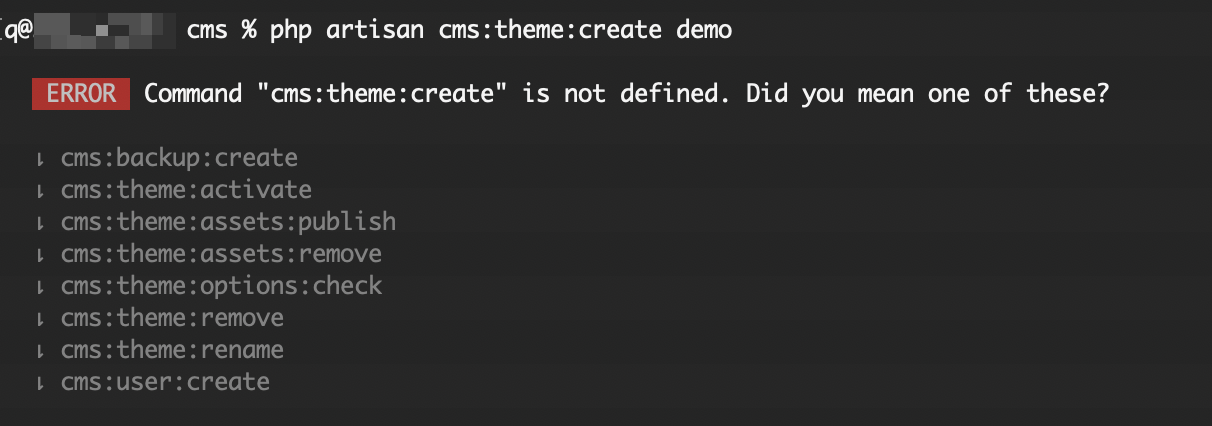
You need to delete folder /vendor and run command composer install to reinstall it, then you will have that command.
To delete an existing theme, use the command:
php artisan cms:theme:remove demoTheme Metadata (theme.json)
The theme.json file at the theme root contains metadata the installer reads to show available themes, theme presets, and required plugins.
Minimal example:
{
    "id": "botble/my-theme",
    "name": "My Theme",
    "namespace": "Theme\\MyTheme\\",
    "author": "thesky9",
    "url": "https://thesky9.com",
    "description": "My Theme description",
    "required_plugins": []
}
Theme presets (multi-home demos)
If your theme ships multiple demo databases (e.g. Home 1, Home 2, …), add a presets array so the installer shows a preset picker during /install/welcome. Each preset is an object:
{
    "presets": [
        {
            "id": "home-1",
            "name": "Home 1",
            "screenshot": "screenshot-home-1.png",
            "database": "database.sql"
        },
        {
            "id": "home-2",
            "name": "Home 2",
            "screenshot": "screenshot-home-2.png",
            "database": "database-home2.sql"
        }
    ]
}
Preset fields:
id(optional) — slug used internally. If omitted, generated fromnameviaStr::kebab().name(required) — label shown in the installer preset picker.screenshot(optional) — filename of a preview image inside the theme root.database(optional) — path to the SQL dump for this preset, relative to the project root. The installer loads this file when the preset is selected. If the file is missing or the field is omitted, the installer falls back todatabase-{themeId}-{presetId}.sql, thendatabase/sample/database-{presetId}.sql, thendatabase/sample/database.sql, thendatabase.sql.
The explicit database field lets you keep existing SQL filenames (for example database-home2.sql) without renaming them to match the convention.
WARNING
Each preset entry must be an object. A plain list of strings ("presets": ["Home 1", "Home 2"]) will be filtered out by the installer and no preset picker will appear.
Configuration
INFO
The main config for theme is located in /platform/themes/[theme]/config.php
The config is convenient for setting up basic CSS/JS, partial composer, breadcrumb template and also metas.
Example:
'events' => [

    // Before event inherit from package config and the theme that call before,
    // you can use this event to set meta, breadcrumb template or anything
    // you want inheriting.
    'before' => function($theme)
    {
        // You can remove this line anytime.
        $theme->setTitle('Copyright ©  2017 - Botble CMS');
    },

    // Listen on event before render a theme,
    // this event should call to assign some assets,
    // breadcrumb template.
    'beforeRenderTheme' => function($theme)
    {
        // You may use this event to set up your assets.
        // $theme->asset()->usePath()->add('core', 'core.js');
        // $theme->asset()->add('jquery', 'vendor/jquery/jquery.min.js');
        // $theme->asset()->add('jquery-ui', 'vendor/jqueryui/jquery-ui.min.js', array('jquery'));


        // $theme->partialComposer('header', function($view)
        // {
        //     $view->with('auth', Sentinel::user());
        // });
    },

    // Listen on event before render a layout,
    // this should call to assign style, script for a layout.
    'beforeRenderLayout' => array(

        'default' => function($theme)
        {
            // $theme->asset()->usePath()->add('ipad', 'css/layouts/ipad.css');
        }

    )
]
Basic usage
namespace App\Http\Controllers;

use Theme;

class HomeController extends Controller {

    public function getIndex()
    {
        $theme = Theme::uses('default')->layout('mobile');

        $view = [
            'name' => 'Thesky9'
        ];

        // home.index will look up the path 'platform/themes/your-theme/views/home/index.blade.php'
        return $theme->scope('home.index', $view)->render();
    }

}
INFO
Get only content "$theme->of('home.index')->content();".
To find the location of a view.
$which = $theme->scope('home.index')->location();

echo $which; // theme::views.home.index

$which = $theme->scope('home.index')->location(true);

echo $which; // ./platform/themes/name/views/home/index.blade.php
Partials
Render a partial in your layouts or views.
// This will look up to "platform/themes/[theme]/partials/header.php"
echo Theme::partial('header', ['title' => 'Header']);

// Partial with current layout specific.
// This will look up up to "platform/themes/[theme]/partials/[CURRENT_LAYOUT]/header.php"
echo Theme::partialWithLayout('header', ['title' => 'Header']);
Finding from both theme's partial and application's partials.
echo Theme::watchPartial('header', ['title' => 'Header']);Partial composer.
$theme->partialComposer('header', function($view) {
    $view->with('key', 'value');
});

// Working with partialWithLayout.
$theme->partialComposer('header', function($view) {
    $view->with('key', 'value');
}, 'layout-name');
Working with regions.
Theme has magic methods to set, prepend and append anything.
$theme->setTitle('Your title');

$theme->appendTitle('Your appended title');

$theme->prependTitle('Hello: ....');

$theme->setAnything('anything');

$theme->setFoo('foo');

// or

$theme->set('foo', 'foo');
Render in your layout or view.
Theme::getAnything();

Theme::getFoo();

// or use place.

Theme::place('anything');

Theme::place('foo', 'default-value-if-it-does-not-exist');

// or

Theme::get('foo');
Check if the place exists or not.
@if (Theme::has('title'))
    {{ Theme::place('title') }}
@endif

// or

@if (Theme::hasTitle())
    {{ Theme::getTitle() }}
@endif
Get argument assigned to content in layout or region.
Theme::getContentArguments();

// or

Theme::getContentArgument('name');

// To check if it exists

Theme::hasContentArgument('name');
INFO
Theme::place('content') is a reserve region to render sub-view.
Preparing data to view
Sometimes you don't need to execute heavy processing, so you can prepare and use when you need it.
$theme->bind('something', function() {
    return 'This is bound parameter.';
});
Using bound data on view.
echo Theme::bind('something');Using theme global
use Botble\Theme\Contracts\Theme;
use App\Http\Controllers\Controller;

class BaseController extends Controller {

    protected $theme;

    public function __construct(Theme $theme)
    {
        // Using theme as a global.
        $this->theme = $theme->uses('default')->layout('ipad');
    }

}
To override theme or layout.
public function getIndex()
{
    $this->theme->uses('newone');

    // or just override layout
    $this->theme->layout('desktop');

    $this->theme->of('somewhere.index')->render();
}
Site Information Helpers
The Theme facade provides helper methods to retrieve common site information configured through theme options.
Logo and Favicon
// Get logo URL
$logoUrl = Theme::getLogo();

// Get logo for a specific key (e.g., 'logo_light', 'logo_dark')
$darkLogo = Theme::getLogo('logo_dark');

// Get logo as an HTML <img> tag with attributes
$logoHtml = Theme::getLogoImage(
    attributes: ['class' => 'site-logo', 'alt' => 'My Site'],
    logoKey: 'logo',
    maxHeight: 50
);

// Get favicon URL
$faviconUrl = Theme::getFavicon();

// Get site title
$siteTitle = Theme::getSiteTitle();
Date Formatting
// Format a date using the theme's configured date format
echo Theme::formatDate($post->created_at);

// Format with a custom format
echo Theme::formatDate($post->created_at, 'M d, Y');
Social Sharing
// Render social sharing buttons HTML
echo Theme::renderSocialSharing(
    url: $post->url,
    title: $post->name,
    thumbnail: RvMedia::getImageUrl($post->image)
);
Other Helpers
// Get site copyright text (supports %Y and :year placeholders for current year)
echo Theme::getSiteCopyright();

// Get terms and privacy policy URL
$privacyUrl = Theme::termAndPrivacyPolicyUrl();
Using in Blade Templates
{{-- Logo --}}
<a href="{{ route('public.index') }}">
    {!! Theme::getLogoImage(['class' => 'logo', 'alt' => Theme::getSiteTitle()]) !!}
</a>

{{-- Favicon --}}
<link rel="icon" href="{{ Theme::getFavicon() }}">

{{-- Copyright --}}
<p>{!! Theme::getSiteCopyright() !!}</p>

{{-- Social sharing --}}
{!! Theme::renderSocialSharing($post->url, $post->name) !!}
Rename the theme to the new name
Using command line (Recommended):
php artisan cms:theme:rename [current-name] [new-name]This command handles all the renaming automatically, including database entries.
Manually
- Rename folder
platform/themes/[current-theme-name]toplatform/themes/[new-name]. - Delete folder
public/themes/[current-theme-name](it will be regenerated). - Open table
settingsand replace all keystheme-[current-theme-name]totheme-[new-name], change settingthemeto[new-name]. - Open table
widgetsand replace all values inthemecolumn to the new name[new-name]. - Run
php artisan cms:theme:assets:publish [new-name]to regeneratepublic/themes/[new-name].
TIP
You don't need to manually copy/rename public/themes/. Just delete the old one and the CMS will regenerate it when you activate the theme or publish assets.